Refer
1-Quick start
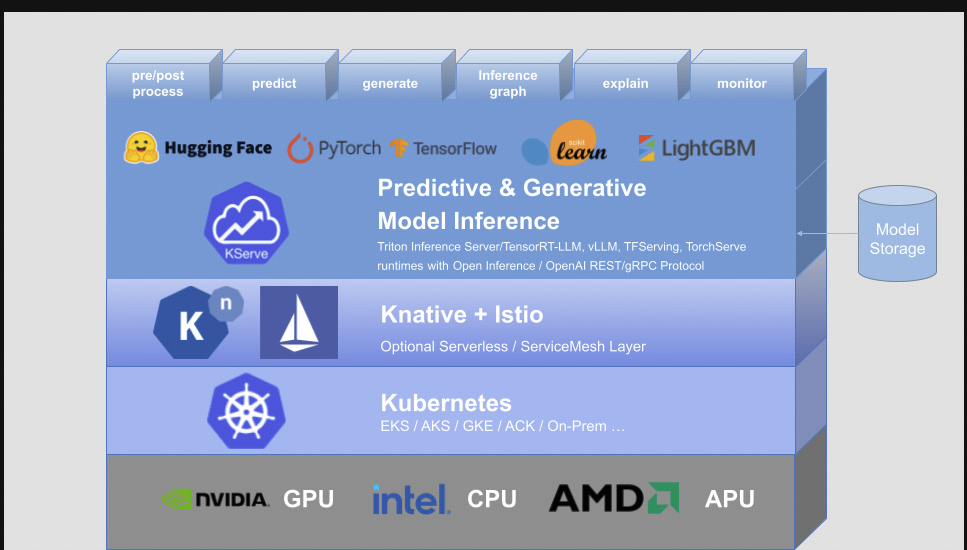
2-HuggingfaceServer
1) Deploy HuggingFace Server on KServe
剩下的 resources 则是通用的设置.
curl -H "content-type:application/json" -v localhost:8080/openai/v1/chat/completions -d '{"model": "qwen15-14b", "messages": [{"role": "user","content": "我的孩子数学不太行,怎么办怎么办"}], "stream":false }'可能得配置:
apiVersion: "serving.kserve.io/v1beta1"
kind: "InferenceService"
metadata:
  name: "llama2-7b-chat"
  namespace: "${YOUR-NS}"
spec:
  predictor:
    model:
      modelFormat:
        name: huggingface
      args:
        - "--model_dir=/mnt/models/Llama-2-7b-chat-hf"
        - "--model_name=llama2"
      storageUri: "pvc://global-shared/models"
      resources:
        limits:
          cpu: "6"
          memory: 24Gi
          nvidia.com/gpu: "1"
        requests:
          cpu: "6"
          memory: 24Gi
          nvidia.com/gpu: "1"
核心配置如下:
modelFormat:huggingface, 这就告诉了镜像启动的时候用huggingfaceserver去开启推理服务- 然后
args的参数则是huggingfaceserver子模块启动的参数.- 支持的参数 ,可以直接看 源码
额外的:
• SAFETENSORS_FAST_GPU 被默认设置,以提高模型加载性能。
• HF_HUB_DISABLE_TELEMETRY 被默认设置,以禁用遥测
2) 解释一下上面的存储位置
一般在外网指定一个 model_id 就可以. 这里是离线版本.
首先, storageUri: "pvc://global-shared/models" 会被挂载到 /mnt/models 目录,不管写什么都会挂载到 /mnt/models 目录. 硬编码写死在 代码 storage.py 中.
所以我们要确保:
- 在
pvc卷下面有这个目录Llama-2-7b-chat-hf. - 这个目录必须符合
huggingface的model格式,有一个config.json能代表他所有的元数据. - 确保
pvc卷中Llama-2-7b-chat-hf这个目录的权限有755可读取,需要复制到容器内部
3) test
## 1. 先临时转发绕过 ingress 权限校验
kubectl port-forward -n .... pod/huggingface-qwen15-14b-predictor-00001-deployment-6f7f8c45h7n85 8080:8080

## 2.
root@gpu7:~# curl -H "content-type:application/json"  localhost:8080/openai/v1/completions -d '{"model": "llama2", "prompt": "你好! 我们用中文打个招呼", "stream":false, "max_tokens": 30 }'
{"id":"cmpl-b00630ab36db4fe5833632c5a5dd3322","choices":[{"finish_reason":"length","index":0,"logprobs":null,"text":"。 Hi there! We're using Chinese to greet you. 😊🇨🇳\n\n在"}],"created":1724299244,"model":"llama2","system_fingerprint":null,"object":"text_completion","usage":{"completion_tokens":30,"prompt_tokens":19,"total_tokens":49}
3-Custom Image
ARG PYTHON_VERSION=3.9
ARG BASE_IMAGE=python:${PYTHON_VERSION}-slim-bullseye

FROM ${BASE_IMAGE} as builder

COPY pip.conf /etc/pip.conf

RUN useradd kserve -m -u 1000 -d /home/kserve
USER 1000

RUN pip install vllm
这个姿势,参考了 阿里的 KServe 的部署方式,感觉很灵活,很舒服,这里随便用一个镜像测试一下.
apiVersion: "serving.kserve.io/v1beta1"
kind: "InferenceService"
metadata:
  name: "ysz-t1"
  namespace: "Your-ns"
  annotations:
    "sidecar.istio.io/inject": "false"
spec:
  predictor:
    containers:
      - name: kserve-vllm
        image: kserve/vllm:v1.9.0-dirty
        imagePullPolicy: Always
        command: ["/bin/sh", "-c"]
        args: ["python3 -m vllm.entrypoints.openai.api_server --port 8080 --trust-remote-code --served-model-name qwen --model /mnt/models/Qwen1.5-14B-Chat"]
        env:
          - name: STORAGE_URI
            value: "pvc://global-shared/models"
        resources:
          limits:
            cpu: "6"
            memory: "24Gi"
            nvidia.com/gpu: "1"
          requests:
            cpu: "6"
            memory: "24Gi"
            nvidia.com/gpu: "1"
        readinessProbe:
          tcpSocket:
            port: 8080
          initialDelaySeconds: 30
          periodSeconds: 10
timeoutSeconds: 5- 没有
model参数,使用 环境变量代表资源位置.
curl -X POST "http://Your-service-url/v1/completions" \
-H "Content-Type: application/json" \
-H "Host: ...." \
-d '{"model": "qwen", "prompt": "你好! 我们用中文打个招呼", "stream": false, "max_tokens": 30}'
{
"id": "cmpl-8c7ac313bcd94833b46d40969bbb1d55",
"object": "text_completion",
"created": 1724329482,
"model": "qwen",
"choices": [
{
"index": 0,
"text": "吧。 您好!很高兴用中文和您交流。有什么可以帮助您的吗?",
"logprobs": null,
"finish_reason": "stop",
"stop_reason": null
}
],
"usage": {
"prompt_tokens": 10,
"total_tokens": 29,
"completion_tokens": 19
}
}4-Multiple Gpu card
apiVersion: "serving.kserve.io/v1beta1"
kind: "InferenceService"
metadata:
  name: "qwen2-72b"
  namespace: "${Your-NS}"
  annotations:
    "sidecar.istio.io/inject": "false"
spec:
  predictor:
    volumes:
    - name: dshm
      emptyDir:
        medium: Memory
        sizeLimit: "10Gi"
    model:
      volumeMounts:
        - mountPath: /dev/shm
          name: dshm
          readOnly: false
      modelFormat:
        name: huggingface
      args:
        - "--model_dir=/mnt/models/Qwen2-72B-Instruct-GPTQ-Int4"
        - "--model_name=qwen2-72b"
        - "--max_length=6144"
        - "--trust-remote-code"
        - '--gpu-memory-utilization=0.95'
        - "--quantization gptq"
      storageUri: "pvc://global-shared/models"
      resources:
        limits:
          cpu: '24'
          memory: 300Gi
          nvidia.com/gpu: '2'
        requests:
          cpu: '24'
          memory: 300Gi
          nvidia.com/gpu: '2'