1-介绍
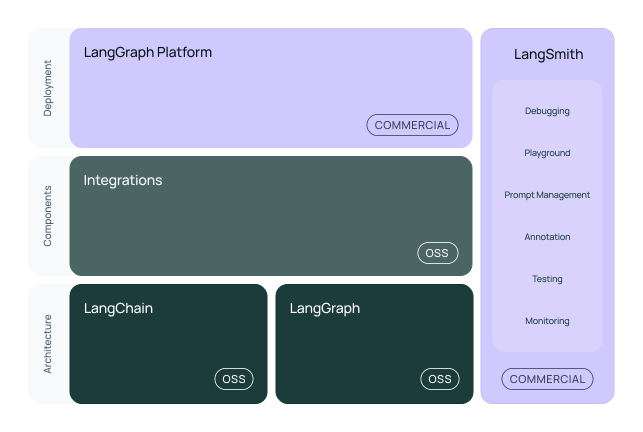
1)-如下图所示, 提供了在 llm 应用的 开发-产品-部署 阶段的工具链.
- Development:
- 提供开源组件库,可以快速搭建 LLM 应用
- 通过
LangGraph构建有状态的 AI 代理,支持流式处理和人机交互
- Productionization
- 使用
LangSmith工具进行应用检查、监控和评估 - 持续优化应用性能
- 提供可视化的调试和分析功能
- 使用
- Deployment
- 将 LangGraph 应用转换为生产就绪的 API
- 支持构建 AI 助手应用
- 提供完整的部署解决方案
2)-Hello world
from langchain_openai import ChatOpenAI

from langchain_core.messages import HumanMessage, SystemMessage

model = ChatOpenAI(
    model="${YOUR_MODEL_NAME}",
    base_url="....",
    api_key="....",
    temperature=0.2,
    top_p=0.9
)


def test_invoke():
    """
    测试基础的能力
    :return:
    """    messages = [
        SystemMessage("Translate the following from English into Italian"),
        HumanMessage("hi!"),
    ]

    print(model.invoke(messages))


def test_streaming():
    """
    测试流式传输能力
    :return:
    """    messages = [
        SystemMessage("Translate the following from English into Italian"),
        HumanMessage("hi!"),
    ]

    for token in model.stream(messages):
        print(token.content, end="|")
3)-Prompt Templates
# 1. 定义模板
from langchain_core.prompts import ChatPromptTemplate

system_template = "Translate the following from English into {language}"
prompt_template = ChatPromptTemplate.from_messages([
    ("system", system_template),
    ("user", "{text}")
])

# 2. 使用模板
prompt = prompt_template.invoke({
    "language": "Italian",
    "text": "hi!"
})

# 3. 获取消息
messages = prompt.to_messages()

# 4. 调用模型
response = model.invoke(prompt)
最基本的模版能力,也就是文本渲染.
flowchart LR

    A[原始输入] --> B[Prompt Template]

    B --> C[格式化提示]

    C --> D[语言模型]

    subgraph 模板处理

    E[系统消息模板] --> B

    F[用户消息模板] --> B

    end

    style B fill:#f9f

    style C fill:#9cf

    style D fill:#fc9
2-ChatBot 能力
关于管理 Memory
关于管理
Memory,langchain在v0.3之后推荐使用LangGraph的持久化能力来管理Memory. 之前的版本则可以 直接使用RunableWithMessageHistory来管理.
常见的 ChatBot 一般分为3类:
graph TD
    A[聊天机器人类型] --> B[基础对话型]
    A --> C[RAG对话型]
    A --> D[Agent型]

    B -->|仅LLM| E[简单对话]
    C -->|外部数据| F[知识问答]
    D -->|可执行动作| G[任务执行]

    style A fill:#f9f
    style B fill:#9cf
    style C fill:#9cf
    style D fill:#9cf
// wait to learn
…