1-Intro
mindmap
  root((AI Agents
  课程大纲))
    Chapter 0: 入门准备
      工具配置
      平台熟悉
    Chapter 1: 代理基础
      Tools工具
      Thoughts思维
      Actions行动
      Observations观察
      LLMs基础
      特殊令牌
      聊天模板
      Python函数工具
    Chapter 2: 框架学习
      smolagents
      LangGraph
      LLamaIndex
    Chapter 3: 实际应用
      真实场景
      开放贡献
    Chapter 4: 最终作业
      基准测试
      学生排行榜
    Bonus: 额外单元
      待发布内容
2-Introduction to Agents
2-1 What is an Agent?
Afred is An Agent
Imagine Alfred receives a command, such as: “Alfred, I would like a coffee please.”
sequenceDiagram
    participant User
    participant Alfred
    participant Brain as Alfred's Brain (LLM)
    participant Tools
    participant Environment

    User->>Alfred: "Alfred, I would like a coffee please."

    Note over Alfred,Brain: 理解阶段
    Alfred->>Brain: 解析自然语言请求

    Note over Brain: 推理和规划阶段
    Brain-->>Brain: 1. 分析任务需求
    Brain-->>Brain: 2. 制定行动计划
    Brain-->>Brain: 3. 确定所需工具

    Note over Alfred,Environment: 执行阶段
    Alfred->>Environment: 1. 移动到厨房
    Alfred->>Tools: 2. 使用咖啡机
    Tools-->>Environment: 3. 煮咖啡
    Alfred->>User: 4. 递送咖啡

    Note over Alfred,User: 任务完成
    User->>Alfred: 确认完成

We call it Agent because it has agency , aka it has the ability to interact with the environment.
Agent 的定义
An Agent is a system that leverages an AI model to interact with its environment in order to achieve a user-defined objective. It combines reasoning, planning, and the execution of actions (often via external tools) to fulfill tasks.
核心 通过大脑和身体的协调 , 有能力去跟环境交互.
Agent 是有能力边界的, 他的边界 取决于我们的 agent 等价于什么, 如果是一个 human, 那边就不能 fly .
graph TB
    Agent[智能代理 Agent]
    Brain[大脑 - AI模型]
    Body[身体 - 能力工具]
    LLM[大语言模型]
    VLM[视觉语言模型]
    Actions[可执行动作]

    Agent --> Brain
    Agent --> Body

    Brain --> LLM
    Brain --> VLM

    Body --> Actions

    LLM -->|输入输出| Text[文本处理]
    VLM -->|输入| Image[图像处理]
    VLM -->|输入输出| Text

    Actions -->|例如| Act1[走路]
    Actions -->|例如| Act2[跑步]
    Actions -->|例如| Act3[抓取]
What type of tasks can an Agent do?
graph TB
    Agent[Agent系统]
    Brain[大脑 - LLM]
    Tools[工具集]
    Actions[行动]

    Agent --> Brain
    Agent --> Tools

    Brain -->|决策| Actions
    Tools -->|支持| Actions

    subgraph 实际应用
    VA[虚拟助手]
    CB[客服机器人]
    NPC[游戏NPC]
    end

    Actions --> VA
    Actions --> CB
    Actions --> NPC

    subgraph 核心能力
    NL[理解自然语言]
    RP[推理和规划]
    IE[环境交互]
    end

    Brain --> NL
    Brain --> RP
    Tools --> IE
LLM提供了理解 和 决策的 能力Tools提供了执行的能力Actions则是把决策执行的桥梁
Notes
Note that Actions are not the same as Tools. An Action, for instance, can involve the use of multiple Tools to complete.
3 What are LLMs?
3-1 What is large language model?
mindmap
  root((大语言模型<br>LLM))
    (架构类型)
      [编码器 Encoder]
        (文本分类)
        (语义搜索)
        (命名实体识别)
        (规模:数百万参数)
      [解码器 Decoder]
        (文本生成)
        (聊天机器人)
        (代码生成)
        (规模:数十亿参数)
      [序列到序列 Seq2Seq]
        (机器翻译)
        (文本摘要)
        (文本改写)
        (规模:数百万参数)
    (工作原理)
      [Token处理]
        (分词处理)
        (预测下一个Token)
        (子词单位组合)
      [词汇规模]
        (约3.2万个token)
        (支持60万个英语单词)
    (主流模型)
      [OpenAI]
        (GPT4)
      [Meta]
        (Llama 3)
      [Google]
        (Gemma)
      [其他]
        (Deepseek-R1)
        (SmolLM2)
        (Mistral)
主流LLM模型及提供商:
| 类型 | 描述 | 示例 | 应用场景 | 典型参数规模 |
|---|---|---|---|---|
| Encoders (编码器) | 将文本(或其他数据)作为输入,输出文本的密集表示(嵌入) | BERT (Google) | • 文本分类 • 语义搜索 • 命名实体识别 | 数百万级 |
| Decoders (解码器) | 专注于逐个生成新token来完成序列 | Llama (Meta) | • 文本生成 • 聊天机器人 • 代码生成 | 数十亿级 (10^9) |
| Seq2Seq (序列到序列) | 结合编码器和解码器,编码器首先将输入序列处理成上下文表示,然后解码器生成输出序列 | • T5 • BART | • 机器翻译 • 文本摘要 • 释义 | 数百万级 |
• Deepseek-R1 (DeepSeek) • GPT4 (OpenAI) • Llama 3 (Meta) • SmolLM2 (Hugging Face) • Gemma (Google) • Mistral (Mistral)
什么是 Token?
语言到计算机的桥梁:
- 首先, 计算机只能处理数字. 每个
Token被设计为对应一个为一个数字ID; - 其次是 词汇表的限制, 自然语言的词汇量非常的巨大, 光是英语就有 60W, 而
Token的系统仅仅用3.2W个基本单位就能组合出来更多的词 - 处理效率的考虑: 比较小的词汇表, 则意味着更少的参数, 训练和推理的速度更快, 内存的占用也更少.
token 的一般规则:
- 英文
- 一个单词通常是1-2个token
- 较长或罕见的词可能是3-4个token
- 专业术语可能被分解为更多token
- 中文
- 通常每个汉字是一个token
- 常用词组可能作为整体是一个token
- 标点符号各占一个token
- 数字和特殊字符
- 连续的数字可能被组合成一个token
- 特殊字符通常单独成token
- 空格也计入token数量
3-2 理解 next token 的 precition

LLM 一般称为自回归的:
- 一次预测的输出会成为下一次预测的输入 ;
- 这个循环会持续到 预测出
EOS
| Model | Provider | EOS Token | Functionality |
|---|---|---|---|
| GPT4 | OpenAI | <|endoftext|> | End of message text |
| Llama 3 | Meta (Facebook AI Research) | <|eot_id|> | End of sequence |
| Deepseek-R1 | DeepSeek | <|end_of_sentence|> | End of message text |
| SmolLM2 | Hugging Face | <|im_end|> | End of instruction or message |
| Gemma | <end_of_turn> | End of conversation turn |
flowchart TB
    Start[输入文本] --> Tokenize[Token化]
    Tokenize --> Represent[计算序列表示]
    Represent --> Score[计算token得分]

    Score --> Strategy{解码策略}
    Strategy --> Greedy[贪心搜索]
    Strategy --> Beam[束搜索]

    Greedy --> MaxScore[选择最高分Token]
    Beam --> Multiple[探索多个序列]

    MaxScore --> Check{是否EOS?}
    Multiple --> Check

    Check -->|是| End[结束]
    Check -->|否| Represent
贪心比较简单,但是容易错过全局的最优解
BeamSearch 则是更高级的策略,会同时探索多个候选队列,寻找总分最高的序列,即使某些 token 分数低也有更能被选择
sequenceDiagram
    participant Input as 输入序列
    participant Model as 模型
    participant Output as 输出序列

    Input->>Model: 初始文本
    loop 直到生成EOS
        Model->>Model: 计算token概率
        Model->>Output: 选择下一个token
        Output->>Input: 更新输入序列
    end
3-3 Attention is all your need

Attention is all you need- Transformer 架构的核心- 在预测下一个词的时候, 每个词的重要性是不一样的
- 例如:
The capital of France is ...中, “France” 和 “Capital” 携带了最重要的信息
4-Messages and Special Tokens
4-1 Messages: 对话管理
理解 LLM 的对话管理机制.
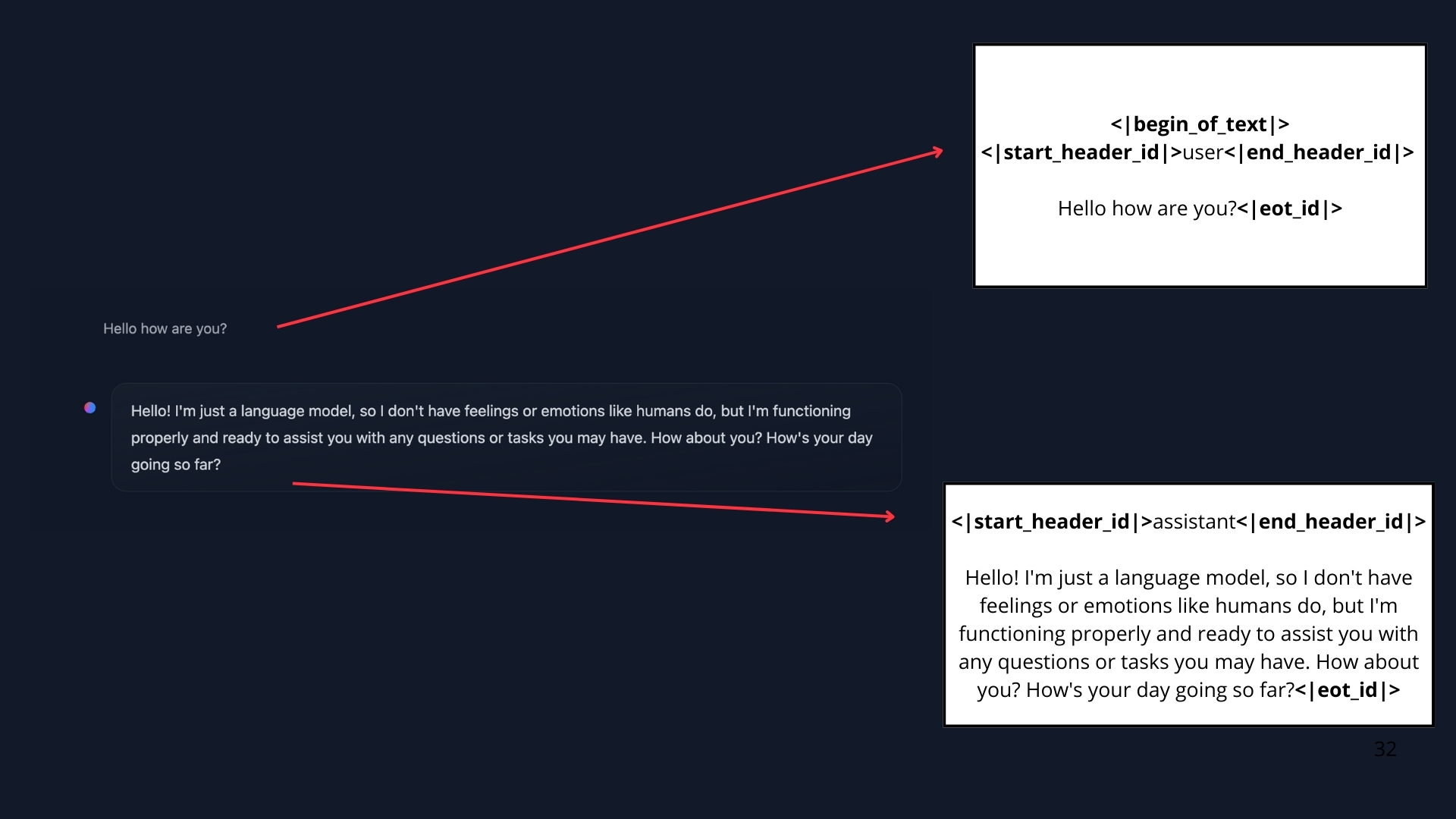
- 用户看到的是: 聊天界面的对话形式
- 实际处理: 所有消息被合并为单一提示词
- 模型特点: 无 “记忆”, 每次都完整读取对话的历史
ChatTemplate 的作用:
flowchart LR
    A[用户消息] --> B[对话模板]
    C[系统消息] --> B
    D[助手消息] --> B
    B --> E[格式化提示词]
    E --> F[LLM]
有2种类型的消息, 系统消息和对话消息
system_message = {
    "role": "system",
    "content": "You are a professional customer service agent. Always be polite, clear, and helpful."
}
对话消息.
conversation = [
    {"role": "user", "content": "I need help with my order"},
    {"role": "assistant", "content": "I'd be happy to help. Could you provide your order number?"},
    {"role": "user", "content": "It's ORDER-123"},
]
系统消息也叫做系统提示词 定义了模型应该如何表现,作为持久性指令指导后续的所有交互.
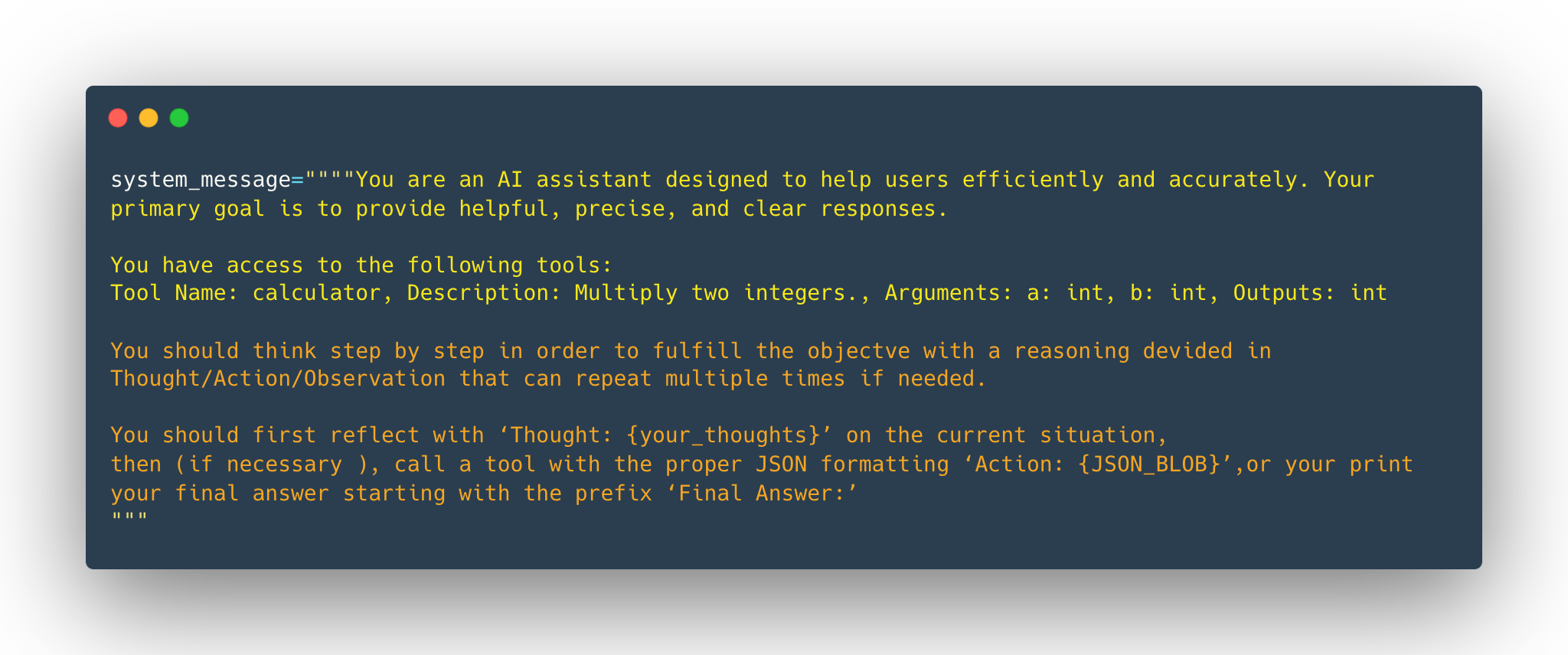
而且在使用 Agents 的时候, 系统消息同样要提供 工具的信息:
- avaiable tools
- instructions to the model on how to format the actions to take
- guidelines on how the thought process should be segmented.
大致如下:
system_message = {
    "role": "system",
    "content": """
    你是一个智能助手,具备以下能力和要求:

    1. 可用工具:
       - web_search: 网络搜索
       - calculator: 数学计算
       - weather_api: 天气查询

    2. 动作格式:
       执行工具时使用如下格式:
       <action>
       tool: [工具名称]
       params: {
           "query": "搜索内容"
       }
       </action>

    3. 思维过程:
       请按以下步骤思考:
       - Thought: 理解需求
       - Action: 选择工具
       - Observation: 分析结果
       - Plan: 规划下一步
       - Response: 生成答案

    注意:
    - 每个工具调用必须遵循格式规范
    - 清晰记录每个思维步骤
    - 确保回答准确且有帮助
    """
}
)-聊天模版通过保存对话历史来维护上下文
conversation = [
    {"role": "user", "content": "I need help with my order"},
    {"role": "assistant", "content": "I'd be happy to help. Could you provide your order number?"},
    {"role": "user", "content": "It's ORDER-123"},
]
SmoILM2
<|im_start|>system
You are a helpful AI assistant named SmolLM, trained by Hugging Face<|im_end|>
<|im_start|>user
I need help with my order<|im_end|>
<|im_start|>assistant
I'd be happy to help. Could you provide your order number?<|im_end|>
<|im_start|>user
It's ORDER-123<|im_end|>
<|im_start|>assistant
Llama 3.2
<|begin_of_text|><|start_header_id|>system<|end_header_id|>

Cutting Knowledge Date: December 2023
Today Date: 10 Feb 2025

<|eot_id|><|start_header_id|>user<|end_header_id|>

I need help with my order<|eot_id|><|start_header_id|>assistant<|end_header_id|>

I'd be happy to help. Could you provide your order number?<|eot_id|><|start_header_id|>user<|end_header_id|>

It's ORDER-123<|eot_id|><|start_header_id|>assistant<|end_header_id|>
对话模版的作用:
▪ 维护对话上下文 ▪ 确保格式一致性 ▪ 支持多轮交互
4-2 Chat Templates
)-Instruct Model 和 Base Model
| 特性 | 基础模型 | 指令模型 |
|---|---|---|
| 训练数据 | 原始文本 | 指令数据集 |
| 主要用途 | token预测 | 指令执行 |
| 交互能力 | 需要格式化 | 原生支持 |
| 使用难度 | 较高 | 较低 |
| 模板要求 | 严格 | 灵活 |
Notes
基础模型可以在不同的聊天模板上进行微调,所以当我们使用指令模型时,需要确保使用正确的聊天模板
)-聊天模板的主要作用是将结构化的JSON消息转换为模型可以理解的文本格式
例如 SmoLM2-135M-Instruct 聊天模版的简化版本如下:
{% for message in messages %}
{% if loop.first and messages[0]['role'] != 'system' %}
<|im_start|>system
You are a helpful AI assistant named SmolLM, trained by Hugging Face
<|im_end|>
{% endif %}
<|im_start|>{{ message['role'] }}
{{ message['content'] }}<|im_end|>
{% endfor %}
用户只需要传递聊天记录即可:
messages = [
    {"role": "system", "content": "You are a helpful assistant focused on technical topics."},
    {"role": "user", "content": "Can you explain what a chat template is?"},
    {"role": "assistant", "content": "A chat template structures conversations between users and AI models..."},
    {"role": "user", "content": "How do I use it ?"},
]
给 模型则是如下内容:
<|im_start|>system
You are a helpful assistant focused on technical topics.<|im_end|>
<|im_start|>user
Can you explain what a chat template is?<|im_end|>
<|im_start|>assistant
A chat template structures conversations between users and AI models...<|im_end|>
<|im_start|>user
How do I use it ?<|im_end|>
而 transformers 的库则会在 分词的过程中自动的处理 聊天模版.
可以用 Chat Template Viewer 去体验各种模型
5-What are Tools?
Tools 是 LLM 的能力扩展.
常见的4种 Tool .
- Web Search
- Image generation
- Retrieval
- Api interface
Tips
LLM 只能 text2Text, 我们说的
Tools, 其实是 providing Tools to an Agent, 其实也是通过文本的方式告诉LLM工具的存在.
代码由 Agent 去调用.
sequenceDiagram
    participant User as 用户
    participant LLM as 语言模型
    participant Agent as 代理
    participant Tool as 工具

    User->>LLM: 发送查询
    LLM->>Agent: 生成工具调用文本
    Agent->>Tool: 执行工具调用
    Tool->>Agent: 返回结果
    Agent->>LLM: 添加结果到对话
    LLM->>User: 生成最终响应

    Note over LLM,Tool: 工具描述在系统提示中定义
1)-如何 告诉 LLM 我们的工具
一个例子,我们希望告诉 LLM 我们有一个简单的计算器.
def calculator(a: int, b: int) -> int:
    """Multiply two integers."""
    return a * b

print(calculator.to_string())
我们把 Function Call 的所有信息都合成一个字符串 ,因为 LLM 只能理解文本.
Tool Name: calculator, Description: Multiply two integers., Arguments: a: int, b: int, Outputs: int
这个时候模型就会识别为工具, 知道需要传递设么输入以及从输出中期望得到什么!
这个文本描述是我们 LLM 了解的工具信息.额外的工具也必须保持一致,并且使用相同的格式, 这个过程可能会脆弱, 可能会意外的忽略掉细节.
有一些更好的方式:
2)-Auto-formating Tool Sections
最后的目标是 名称, 功能, 期望的输入和提供的输出.
那分别就是 函数的名称,函数的注释,函数的输入,函数的输出.
@tool
def calculator(a: int, b: int) -> int:
    """Multiply two integers."""
    return a * b

print(calculator.to_string())
同样会得到上面的结果。
Tool Name: calculator, Description: Multiply two integers., Arguments: a: int, b: int, Outputs: int
3)-Generic Tool implementation
通用工具实现.
免责声明:
这个示例实现是虚构的,但与大多数库中的实际实现非常相似。
class Tool:
    """
    表示一个可重用代码片段(工具)的类。

    属性:
        name (str): 工具名称。
        description (str): 工具功能的文本描述。
        func (callable): 此工具包装的函数。
        arguments (list): 参数列表。
        outputs (str or list): 包装函数的返回类型。
    """
    def __init__(self,
                 name: str,
                 description: str,
                 func: callable,
                 arguments: list,
                 outputs: str):
        self.name = name
        self.description = description
        self.func = func
        self.arguments = arguments
        self.outputs = outputs

    def to_string(self) -> str:
        """
        返回工具的字符串表示,
        包括其名称、描述、参数和输出。
        """
        args_str = ", ".join([
            f"{arg_name}: {arg_type}" for arg_name, arg_type in self.arguments
        ])

        return (
            f"Tool Name: {self.name},"
            f" Description: {self.description},"
            f" Arguments: {args_str},"
            f" Outputs: {self.outputs}"
        )

    def __call__(self, *args, **kwargs):
        """
        使用提供的参数调用底层函数(callable)。
        """
        return self.func(*args, **kwargs)
name (str):工具名称description (str):工具功能的简要描述function (callable):工具执行的函数arguments (list):预期的输入参数outputs (str or list):工具的预期输出- call():当工具实例被调用时执行函数
to_string():将工具的属性转换为文本表示
calculator_tool = Tool(
    "calculator",                   # name
    "Multiply two integers.",       # description
    calculator,                     # function to call
    [("a", "int"), ("b", "int")],   # inputs (names and types)
    "int",                          # output
)
6-TOB 设计模式
代理 会在 思考 → 行动 → 观察的持续循环中工作, 每个组件的功能不同.
- Thought : 代理的
LLM部分决定了下一步行动 ; - Action: 代理通过调用相关参数的工具来执行操作 ;
- Observation: 模型对工具的响应进行反思 ;
规则和 guideline 会直接嵌入到 system prompt
graph TD
    A[系统提示] --> B[代理行为定义]
    A --> C[工具访问权限]
    A --> D[循环指令]

    E[思考-行动-观察循环] --> F[思考]
    E --> G[行动]
    E --> H[观察]

    F --> G
    G --> H
    H --> F

    subgraph 执行环境
    I[工具集成]
    J[动态适应]
    K[迭代优化]
    end

    G --> I
    H --> J
    F --> K
官网给了一个 Alfred 的天气工作流:
sequenceDiagram
    participant U as 用户
    participant A as Alfred
    participant T as 工具/API

    U->>A: 询问纽约天气

    loop 思考-行动-观察循环
        A->>A: 思考阶段<br/>分析需求
        A->>T: 行动阶段<br/>调用API
        T-->>A: 返回数据
        A->>A: 观察阶段<br/>处理结果
    end

    A->>U: 返回格式化天气信息

    Note over A: 循环直到目标完成
总结, T-A-O 使用一种和 LLM 的设计模式, LLM 只能理解文本, 一般是作为 system prompt 的方式使用的.
graph TD
    subgraph 循环迭代
        A[开始] --> B[思考]
        B --> C[行动]
        C --> D[观察]
        D -->|需要修正| B
        D -->|目标完成| E[结束]
    end

    subgraph 工具集成
        F[静态知识] --> G[工具API]
        G --> H[实时数据]
        H --> I[扩展能力]
    end

    subgraph 动态适应
        J[新信息] --> K[整合分析]
        K --> L[更新推理]
        L --> M[优化输出]
    end

    style A fill:#f9f,stroke:#333
    style E fill:#f9f,stroke:#333
    style G fill:#ddf,stroke:#333
    style K fill:#dfd,stroke:#333
7-Re-Act Approach
我们深入探讨 AI 代理的内部工作机制 - reason and plan . 我们会探索如果利用 用内部的对话来分析信息, 将复杂的问题分解为可管理的步骤, 并决定下一步采取什么行动.
而 Re-Act 是则是鼓励模型在 行动之前逐步思考的 prompting technique.
graph TD
 A[输入信息] --> B[内部对话]
 B --> C[问题分解]
 C --> D[策略制定]
 D --> E[行动计划]

 style A fill:#f9f,stroke:#333
 style E fill:#dfd,stroke:#333
1)-一些通用的话术
| Type of Thought | Example |
|---|---|
| Planning | “I need to break this task into three steps: 1) gather data, 2) analyze trends, 3) generate report” |
| Analysis | “Based on the error message, the issue appears to be with the database connection parameters” |
| Decision Making | “Given the user’s budget constraints, I should recommend the mid-tier option” |
| Problem Solving | “To optimize this code, I should first profile it to identify bottlenecks” |
| Memory Integration | “The user mentioned their preference for Python earlier, so I’ll provide examples in Python” |
| Self-Reflection | “My last approach didn’t work well, I should try a different strategy” |
| Goal Setting | “To complete this task, I need to first establish the acceptance criteria” |
| Prioritization | “The security vulnerability should be addressed before adding new features” |
2)-对于函数调用进行微调的 LLM, 思考的过程是可选的, 如果你不熟悉函数调用,那么在 Actions 部分会有更多的详细信息
graph TD
    A[LLM模型] --> B{是否微调用于<br/>函数调用?}
    B -->|是| C[直接函数调用]
    B -->|否| D[思考过程]

    C --> E[执行结果]
    D --> F[分析和规划]
    F --> G[函数调用]
    G --> E

    style A fill:#f9f,stroke:#333,stroke-width:2px
    style C fill:#ddf,stroke:#333,stroke-width:2px
    style D fill:#dfd,stroke:#333,stroke-width:2px
3)-ReAct 只是一个提示技术, 但是提示 模型去 逐步的思考这个方向是非常 OK 的
DeepSeek R1 和 OpenAi o1 后面的原理是这样的东西, 这些模型已经被 微调为 在回答之前进行思考 这些模型被训练为 始终包含特定的思考部分 (在 <think> 和 </think>) 特殊标记之间, 这不是 ReACT 这样的提示技术, 而是一种训练方法, 模型通过分析 数千个展示我们期望它做什么的例子来学习生成这些部分.
4)-ReAct 的工作原理
graph TD
    A[问题输入] --> B[Re-Act处理]

    subgraph Re-Act方法
    B --> C[逐步思考提示]
    C --> D[问题分解]
    D --> E[计划生成]
    E --> F[执行计划]
    end

    F --> G[最终解决方案]

    subgraph 传统方法
    A --> H[直接生成解决方案]
    end

    style A fill:#f9f,stroke:#333,stroke-width:2px
    style G fill:#dfd,stroke:#333,stroke-width:2px
    style H fill:#fdd,stroke:#333,stroke-width:2px
5)-Re-Act 方法的演进
timeline
    title Re-Act方法的发展
    section 基础阶段
        提示技术 : 添加"逐步思考"提示
        问题分解 : 将复杂问题拆分为子任务
    section 发展阶段
        模型微调 : Deepseek R1, OpenAI o1
        特殊标记 : <think></think>标记的使用
    section 高级应用
        训练方法 : 基于大量示例的学习
        自动生成 : 自动包含思考部分
8-Actions: Enabling the Agent to Engage with Its Environment
Define
Actions are concrete steps an AI agent to interact with its env.
Agent Types 类型区分:
| Agent类型 | 描述 | 处理方式 | 输出格式 | 适用场景 |
|---|---|---|---|---|
| JSON Agent | 以JSON格式指定行动 | 解析JSON后执行相应操作 | 结构化JSON数据 | 标准化接口调用、API交互 |
| Code Agent | 生成可执行代码块 | 外部解释器执行代码 | 可执行代码块 | 复杂计算、自定义逻辑处理 |
| Function-calling Agent | 经过微调的JSON Agent | 直接调用预定义函数 | 函数调用格式 | 高频固定操作、性能敏感场景 |
Action Types 区分:
| Action类型 | 目的 | 交互对象 | 操作范围 | 示例 |
|---|---|---|---|---|
| 信息收集 | 获取和处理数据 | 数据源、数据库 | 搜索、查询、检索 | 网页搜索、数据库查询 |
| 工具使用 | 执行特定功能 | API、计算工具 | 调用、计算、执行 | API调用、数学计算 |
| 环境交互 | 操作外部系统 | 设备、接口 | 控制、操作、监控 | 设备控制、界面操作 |
| 通信 | 信息交换 | 用户、其他代理 | 对话、协作、反馈 | 用户聊天、代理协作 |
)-The Stop And Parse Approach
STOP 机制的作用: 类似一个句号,控制边界.
graph TD
    A[用户查询] --> B[LLM处理]
    B --> C[生成结构化输出]
    C --> D[添加STOP标记]
    D --> E[解析器处理]

    subgraph LLM输出格式
    F[Thought部分]
    G[Action部分]
    H[隐含的STOP标记]
    end

    style A fill:#f9f,stroke:#333
    style E fill:#ddf,stroke:#333
这种方法让 Agent's 的输出是格式化而且可以预测的, <STOP> 标记底层原理没有详细说明的. 这里仅仅描述了他的作用:
- Generation is a Structured Format
- Halting Further Generation
- Paring the Output
Code Agents: 直接生成代码
对应的是另一种方式, Code Agents.
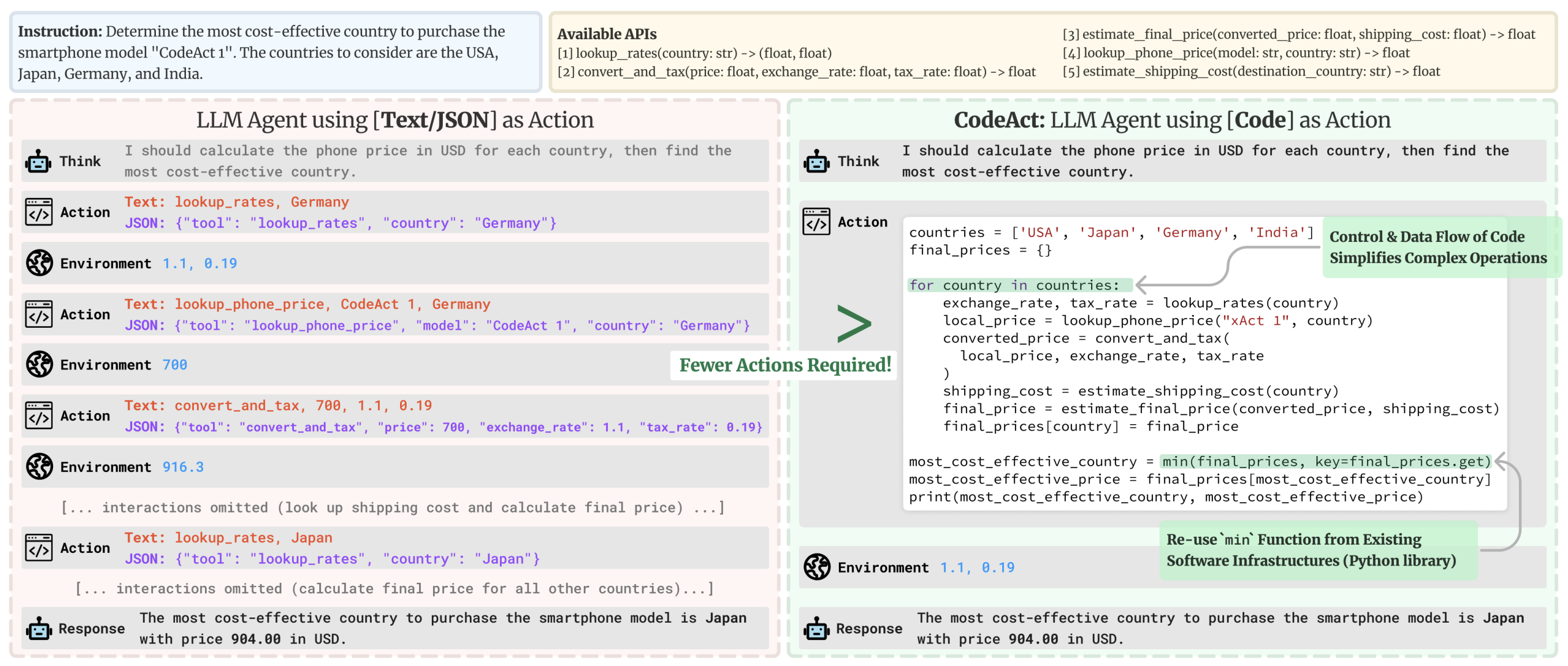
这个想法是: 代替输出简单的 JSON 对象, Code Agent 会直接生成一个可执行的代码块- Python 语言 .
能有一些明显的优势:
- 表达能力: 代码可以自然地表示复杂逻辑,包括循环、条件和嵌套函数,提供比JSON更大的灵活性 ;
- 模块化和可重用性: 生成的代码可以包含在 不同操作或任务中可重用的函数和模块 ;
- 增强的可调试性: 使用明确定义的编程语法, 代码错误通常更容易检测和纠正 ;
- 直接集成:
Code Agent可以直接与外部库和API集成, 实现更复杂的操作, 例如数据处理或者实时决策
# Code Agent Example: Retrieve Weather Information
def get_weather(city):
    import requests
    api_url = f"https://api.weather.com/v1/location/{city}?apiKey=YOUR_API_KEY"
    response = requests.get(api_url)
    if response.status_code == 200:
        data = response.json()
        return data.get("weather", "No weather information available")
    else:
        return "Error: Unable to fetch weather data."

# Execute the function and prepare the final answer
result = get_weather("New York")
final_answer = f"The current weather in New York is: {result}"
print(final_answer)| 特性 | Code Agent | JSON Agent |
|---|---|---|
| 表达能力 | 可以表达复杂逻辑(循环、条件、嵌套) | 仅限于数据结构描述 |
| 模块化 | 支持函数和模块复用 | 较难实现代码复用 |
| 调试能力 | 完整的编程语法,易于调试 | 仅限于数据验证 |
| 集成能力 | 可直接集成外部库和API | 需要额外的集成层 |