1-介绍
✅ 通过搜索网络回答常见问题 ✅ 在多次调用之间维持对话状态 ✅ 将复杂查询转发给人工审核 ✅ 使用自定义状态控制其行为 ✅ 可以回溯并探索替代对话路径
1)-setup
capture --no-stderr
%pip install -U tavily-python langchain_community
演进一个版本: 支持使用外部的搜索工具
"""
基于LangGraph实现的对话系统

本模块实现了一个简单的对话系统,使用LangGraph框架构建对话流程图。
系统支持流式输出对话结果,并可以通过YAML配置文件加载不同的语言模型。

Dependencies:
    - langchain_openai    - langgraph    - typing_extensions"""
import json
from typing import Annotated

from langchain_core.messages import ToolMessage
from langchain_openai import ChatOpenAI
from typing_extensions import TypedDict
from langgraph.graph import StateGraph, START, END
from langgraph.graph.message import add_messages

from langchain_community.tools.tavily_search import TavilySearchResults

from base.model_factory import ModelFactory
from IPython.display import Image


class State(TypedDict):
    """
    定义对话系统的状态类型

    Attributes:        messages (list): 存储对话历史的消息列表
            使用add_messages注解指定状态更新方式为追加而非覆盖
    """    messages: Annotated[list, add_messages]


# 初始化模型工厂和语言模型
mf = ModelFactory[ChatOpenAI]()
mf.load_from_yaml(yaml_path="/Users/carlyu/work/yaww/projects/ai-llm-agent/llm_model_configs.yaml")
llm: ChatOpenAI = mf['doubaoAi']

# 初始化状态图构建器
graph_builder = StateGraph(State)

# 集成搜索引擎工具
tool = TavilySearchResults(max_results=2)
tools = [tool]
llm_with_tools = llm.bind_tools(tools)


def chatbot(state: State):
    """
    对话节点的处理函数

    Args:        state (State): 当前对话状态,包含历史消息列表

    Returns:        dict: 包含新消息的状态更新
    """    return {"messages": [llm_with_tools.invoke(state["messages"])]}


class BasicToolNode:
    """A node that runs the tools requested in the last AIMessage"""

    def __init__(self, llm_tools: list) -> None:
        self.tools_by_name = {it.name: it for it in llm_tools}

    def __call__(self, inputs: dict):
        # 非空则获取最后一条
        if messages := inputs.get("messages", []):
            message = messages[-1]
        else:
            raise ValueError("No message found in input")

        outputs = []
        for tool_call in message.tool_calls:
            tool_result = self.tools_by_name[tool_call["name"]].invoke(
                tool_call["args"]
            )
            outputs.append(
                ToolMessage(
                    content=json.dumps(tool_result),
                    name=tool_call["name"],
                    tool_call_id=tool_call["id"],
                )
            )
        return {"messages": outputs}


def route_tools(
        state: State,
):
    """
    Use in the conditional_edge to route to the ToolNode if the last message    has tool calls. Otherwise, route to the end.    """    if isinstance(state, list):
        ai_message = state[-1]
    elif messages := state.get("messages", []):
        ai_message = messages[-1]
    else:
        raise ValueError(f"No messages found in input state to tool_edge: {state}")
    if hasattr(ai_message, "tool_calls") and len(ai_message.tool_calls) > 0:
        return "tools"
    return END


#
tool_node = BasicToolNode(tools)

# 构建对话流程图
graph_builder.add_node("chatbot", chatbot)
graph_builder.add_node("tools", tool_node)
graph_builder.add_conditional_edges(
    "chatbot",
    route_tools,
    # The following dictionary lets you tell the graph to interpret the condition's outputs as a specific node
    # It defaults to the identity function, but if you    # want to use a node named something else apart from "tools",    # You can update the value of the dictionary to something else    # e.g., "tools": "my_tools"    {"tools": "tools", END: END},
)
# Any time a tool is called, we return to the chatbot to decide the next step
graph_builder.add_edge("tools", "chatbot")
graph_builder.add_edge(START, "chatbot")
graph = graph_builder.compile()


def stream_graph_updates(user_input: str):
    """
    处理用户输入并流式输出助手回复

    Args:        user_input (str): 用户输入的文本

    Returns:        None: 直接打印助手的回复
    """    for event in graph.stream({"messages": [{"role": "user", "content": user_input}]}):
        for value in event.values():
            print("Assistant:", value["messages"][-1].content)


def _main():
    # 主循环:处理用户输入
    while True:
        try:
            user_input = input("User:")
            if user_input.lower() in ["quit", "exit", "q"]:
                print("Goodbye")
                break
            stream_graph_updates(user_input)
        except:
            user_input = "What do you know about LangGraph?"
            print("User: " + user_input)
            stream_graph_updates(user_input)
            break


def debug_graph():
    image = Image(graph.get_graph().draw_mermaid_png())

    with open("01.png", "wb") as f:
        f.write(image.data)


if __name__ == '__main__':
    # debug_graph()
_main()- 增加了一个
tool_node = BasicToolNode(tools), 他的返回是:return {"messages": outputs}这样的结构. - 增加了一条
route_tools条件边决定,集成tools的invoke循环, 最后一条消息如果有tool_calls属性,就去调用对应的工具.
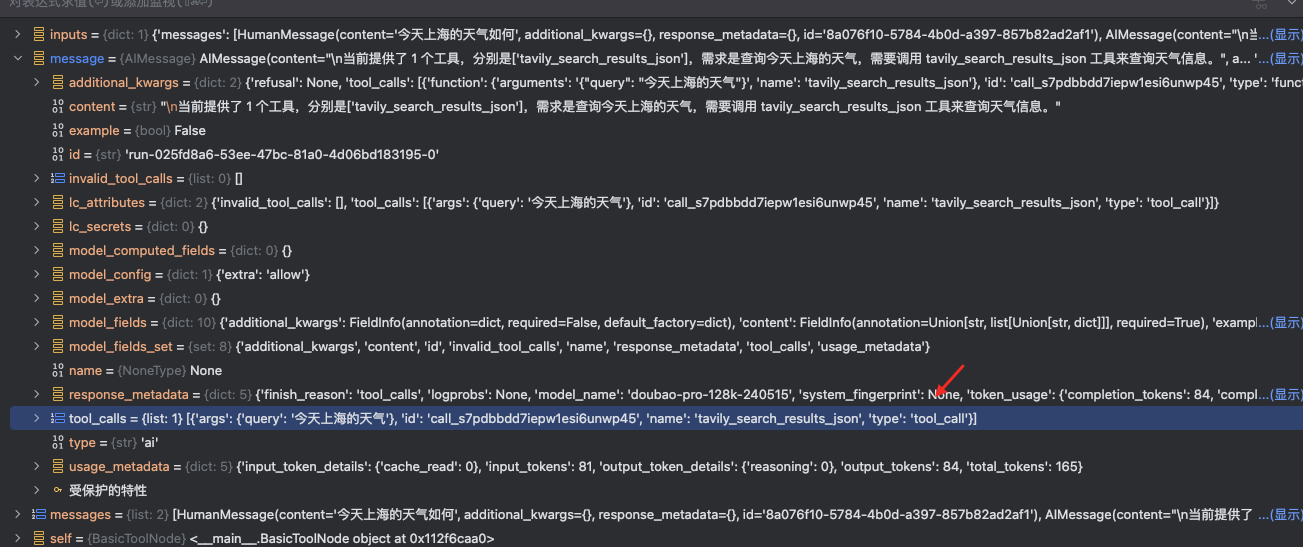
这里的核心上下文内容是通过 内部特殊的 tool_message 封装消息. Debug 内容如下
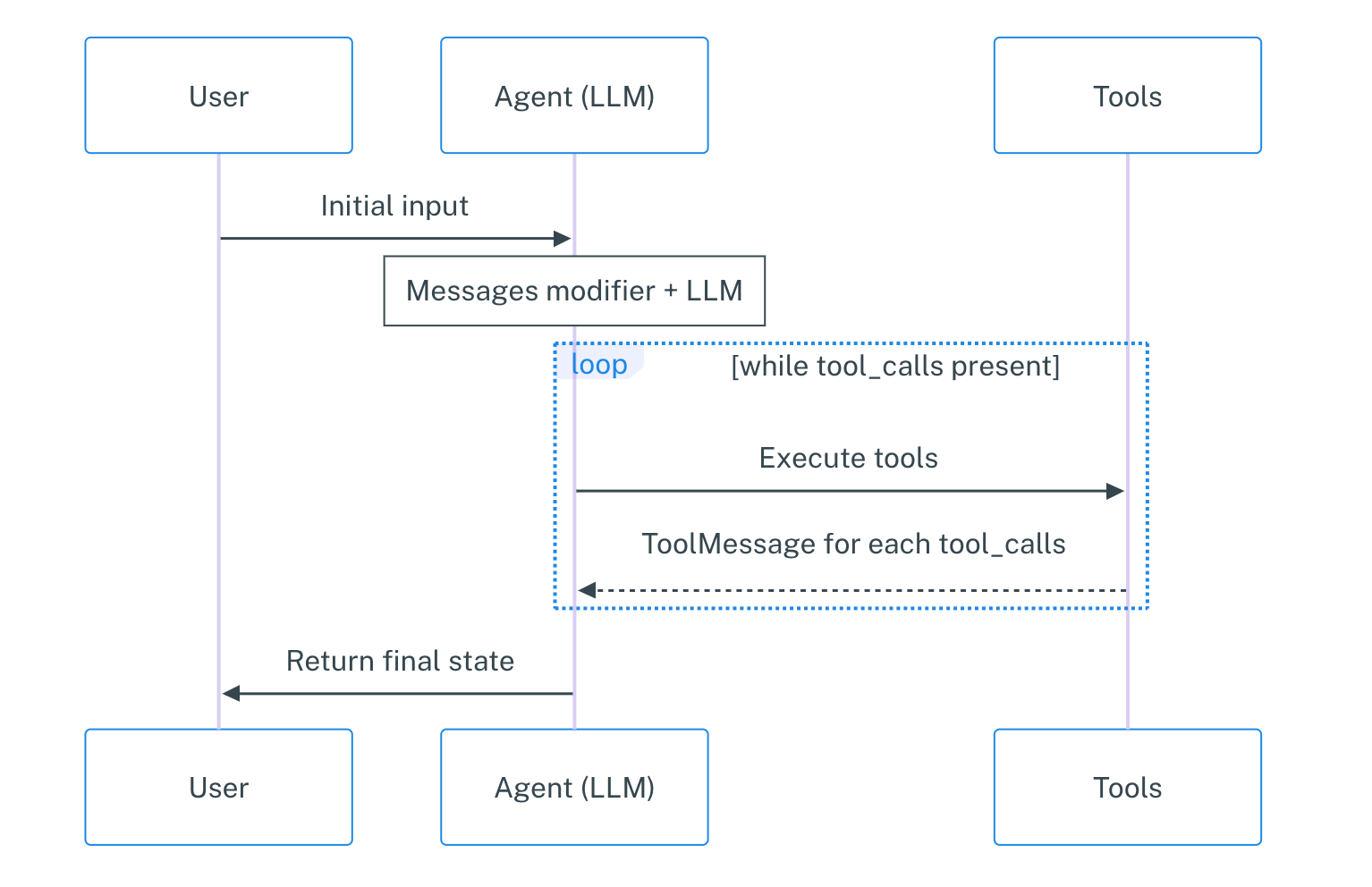
在 langgraph 中已经有预定义的 ToolNode 和对应的 tool_condition .
2-3 Adding Memory to the Chatbot
当前的代码中没有 多轮对话的能力.
LangGraph 解决的办法是利用一个 Persistent checkpointing 的机制来优化这个问题. 如果在编译的时候提供一个检查点器 checkpointer 并在调用图的时候提供一个线程 ID (thread_id), langGraph 会在每个步骤之后自动的去保存状态, 让聊天机器人能够自动的从上次停止的地方继续.
Tips
为什么这里要使用检查点机制, 检查点的功能远比 chatbotMemory 强大 - 它允许你随时保存和恢复复杂的状态, 用于错误恢复、人机交互工作流、 time travel interactions, and more.
使用 checkpointSaver 的方法非常的简单.
memory = MemorySaver()
graph = graph_builder.compile(checkpointer=memory)

config = {"configurable": {"thread_id": "1"}}

def _direct_chat(user_input: str):
    events = graph.stream(
        {"messages": [{"role": "user", "content": user_input}]},
        config=config,
        stream_mode="values",
    )

    for event in events:
        event["messages"][-1].pretty_print()


def _multiple_chat():
    _direct_chat("Hi there! My name is Will.")
    _direct_chat("Remember my name?")
持久化的选择:
- 官方仅仅支持
postgreSql,sqllite的实现 - 官方目前不会考虑支持其他的实现,参考如下的 issue1475